01
Drop in an account
Type the TikTok handle, with or without the @, or paste the full link to a public profile.
Paste a TikTok handle or profile link and Claptik lays out the account's bio, latest videos, reposts, stories, comments, follower lists and visible engagement in one place.
Claptik reads only what an account already shows publicly.
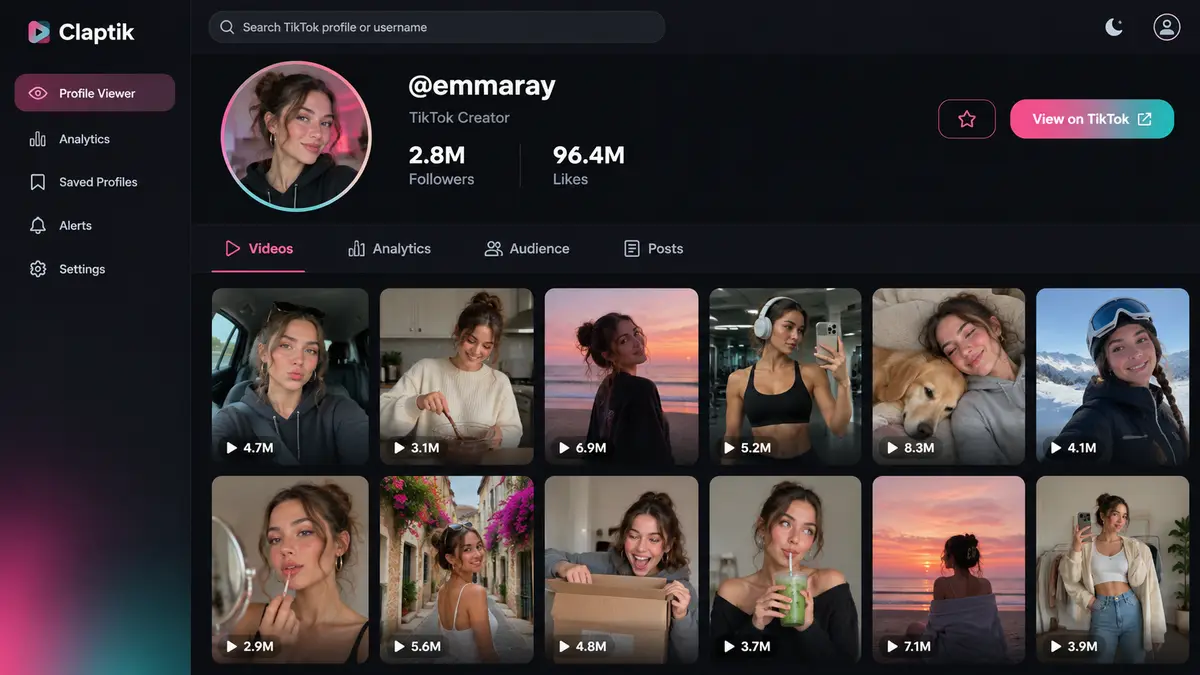
Claptik splits every account into clear sections, so you can jump straight to the videos, lists or threads you came for.
All you need is a username or a public profile URL to begin.
Type the TikTok handle, with or without the @, or paste the full link to a public profile.
It collects the profile details, counts and posts that TikTok already shows to every visitor.
Hop between videos, reposts, stories, follower lists and comments in whatever order suits you.
Claptik turns scattered public TikTok data into one compact overview, so reviewing a creator's profile and newest uploads fits on a single screen instead of a dozen tabs.
A practical tool for anyone who needs a quick, honest read on what TikTok accounts share in public.
Scan recent public videos and spot which formats, hooks and lengths pull the strongest visible response.
Check a creator's profile, posting rhythm and audience size before you decide to reach out or collaborate.
Open several accounts in Claptik and compare follower counts, likes and how their latest posts perform.
Claptik only shows what TikTok already makes public. It can't unlock private profiles, surface hidden posts, get around restrictions or reach any account's personal details, and it never tries to.
Quick answers on public profiles, missing content and how the viewer handles your lookups.
It gathers a public TikTok account's profile details, videos, engagement figures, reposts, stories, follower lists and comments into a single interface that's easy to scan.
Any TikTok profile that is set to public. Enter the handle with or without the @ sign, or paste the full profile URL into Claptik and press the button.
No. It never asks you to connect a TikTok account, and it never requests your password or any other login details.
No. Private and restricted accounts stay closed, because the viewer works only with information that TikTok displays to everyone.
Items may have been deleted, switched to private, blocked in your region, expired after 24 hours, or simply not returned publicly by TikTok at the time of your lookup.
Yes, as long as they're public. Open any post in Claptik to read its comment threads and replies, then sort them by newest, top liked or busiest.
Claptik claims no ownership of TikTok accounts or anyone's posts. All videos, images and trademarks remain the property of their rightful owners.